Most onchain analysis starts with the assumption that someone has already decoded the dataset. On platforms like Dune, analysts can usually query human-readable tables without having to interpret the raw bytes recorded onchain.
But what if the dataset you need doesn’t exist?
I ran into this problem while trying to analyze liquidations on Jupiter Lend during the market selloff on October 10, 2025. I wanted to determine how many liquidations were processed and their total value.
However, there were no query-ready tables for Jupiter Lend, the project’s documentation was limited, and I couldn’t locate a publicly available Interface Description Language (IDL) file.
Before analyzing liquidations, I had to build the dataset.
To do this, I reverse-engineered the program by examining its instructions on Solscan, mapping them to Dune’s tables, and writing SQL queries to decode them.
This two-part series walks through that process. In this guide, you’ll learn how to reverse-engineer instructions and identify Jupiter Lend liquidations to extract the core fields. Part 2 covers building the final dataset.
This is an intermediate-to-advanced guide for analysts familiar with SQL who want to query Solana programs (written in Anchor) from scratch. By the end, you’ll have a repeatable approach for investigating an Anchor program even when there’s no decoded dataset or public IDL available.
What we’re building
We’re building an event-level dataset to track Jupiter Lend liquidations. Each row captures a liquidation, including the assets involved, debt repaid, and collateral seized.
The dataset includes the following columns:
| Column | Description |
|---|---|
tx_id | Transaction ID |
block_time | Time of liquidation |
liquidator | Liquidator address |
position | Liquidated position ID |
collateral_asset | Collateral asset seized |
debt_asset | Debt asset repaid |
collateral_amount_usd | USD value of collateral seized |
debt_amount_usd | USD value of debt repaid |
The complete dataset includes additional fields, such as token mint addresses, token quantities, and cumulative USD values.
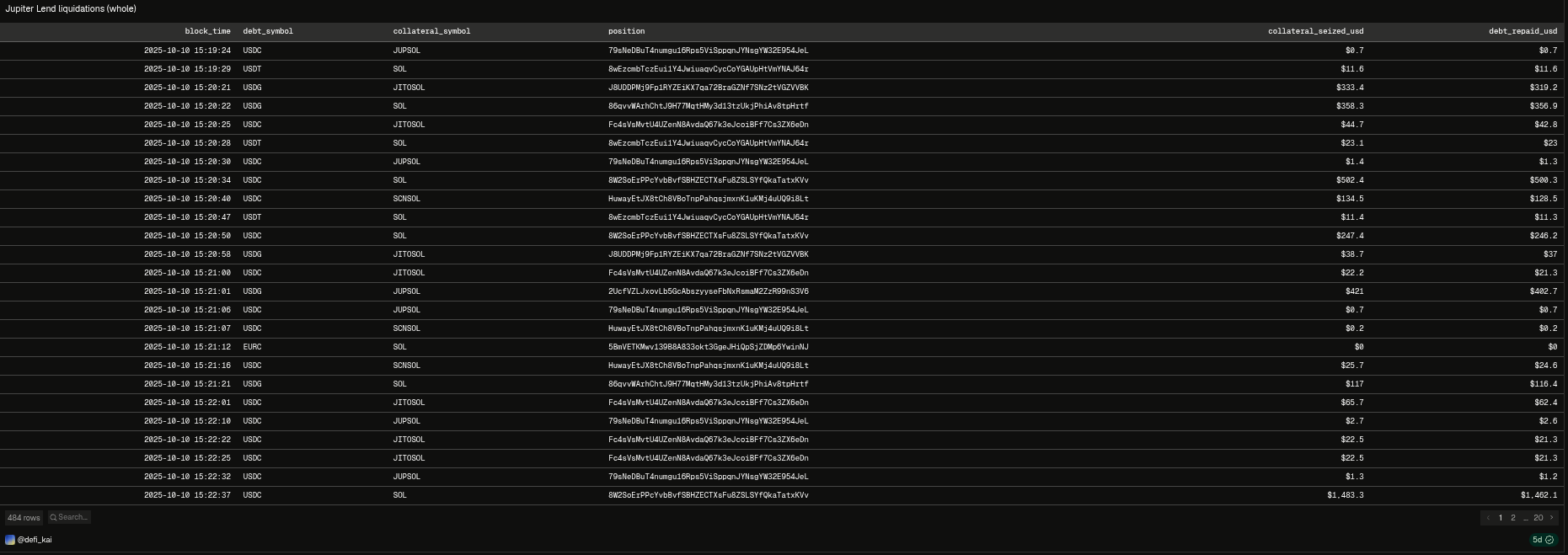
You can find the completed dataset and source code on GitHub.
This dataset can help risk management teams and researchers identify periods of elevated liquidation activity, measure the value of debt repaid and collateral seized, and assess stress within Jupiter Lend’s lending markets.
How Jupiter Lend liquidations work
On Jupiter Lend, users deposit cryptocurrencies or tokenized assets as collateral and can borrow another asset up to a specified loan-to-value (LTV) ratio. Each market also has a liquidation threshold that determines when a borrowing position becomes undercollateralized enough to be eligible for liquidation.
When a position crosses its liquidation threshold, Jupiter Lend can programmatically liquidate part of the position to reduce the risk of default and bad debt for the protocol.
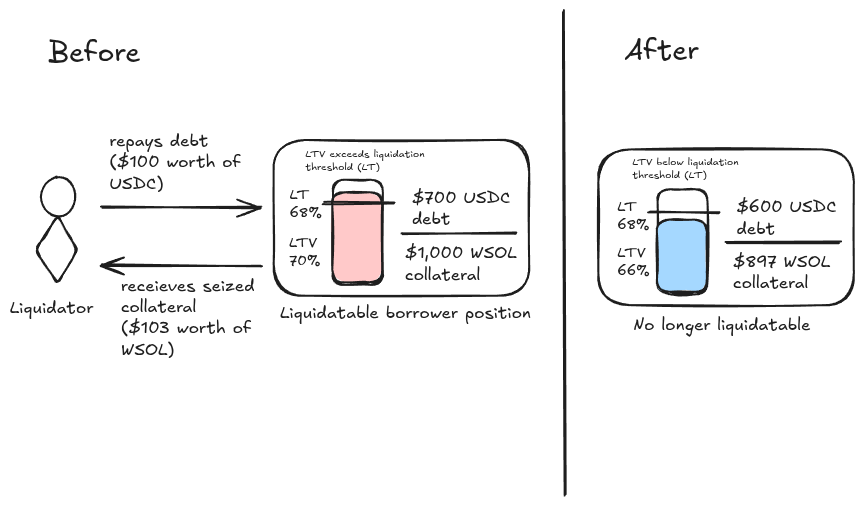
Liquidations are carried out by a permissionless network of liquidators that monitor borrowing positions. During a partial liquidation, a liquidator repays a portion of the borrower’s debt and receives collateral in return, including a liquidation penalty.
How liquidations appear on-chain
Jupiter Lend uses multiple programs to handle different operations. For this walkthrough, we’ll focus on two: Jupiter Lend Borrow, which manages borrowing positions and liquidations, and Jupiter Lend Liquidity, which manages the underlying assets and token transfers.
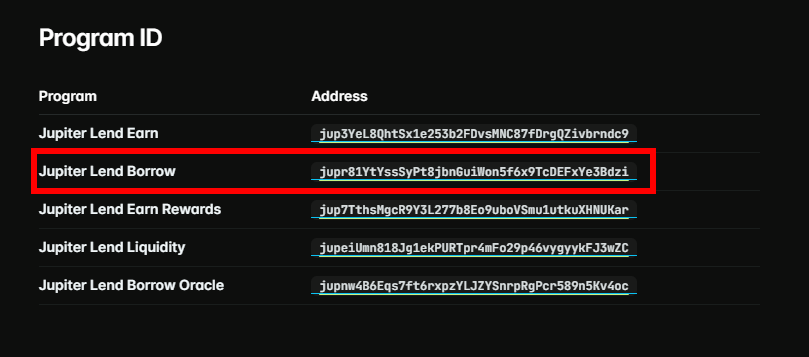
Jupiter Lend Programs https://dev.jup.ag/docs/lend
When a liquidation occurs, the Borrow program executes a Jupiter Lend Borrow: Liquidate instruction. In the transactions examined here, this instruction invokes the Liquidity program twice through cross-program invocations (CPIs). These appear as two Jupiter Lend Liquidity: Operate instructions: one records the debt repayment, while the other records the collateral withdrawal.
Together, these instructions provide the account information and raw amounts we’ll need to reconstruct each liquidation.
Mental model for reverse-engineering
To reverse-engineer Jupiter Lend’s liquidation instructions, we’ll start with a confirmed transaction and inspect its instructions for characteristics that distinguish liquidations from other activity. We’ll use these findings to construct SQL filters in Dune, then validate them against additional confirmed liquidation transactions.
To follow along, keep three tabs open:
- This guide
- Solscan.io - Solana block explorer
- Dune.com - Blockchain data warehouse
Using Dune to query data
Dune ingests and indexes blockchain transactions, allowing analysts to query the data using DuneSQL to create datasets and visualizations.
Dune organizes blockchain data into three buckets:
- Raw data: Blockchain records, including transactions and instructions, stored without decoding their program-specific contents.
- Decoded data: Smart contract and program activity translated into human-readable function calls, events, and arguments.
- Curated data: Standardized datasets that translate the decoded tables into human-readable columns with labels corresponding to financial semantics.
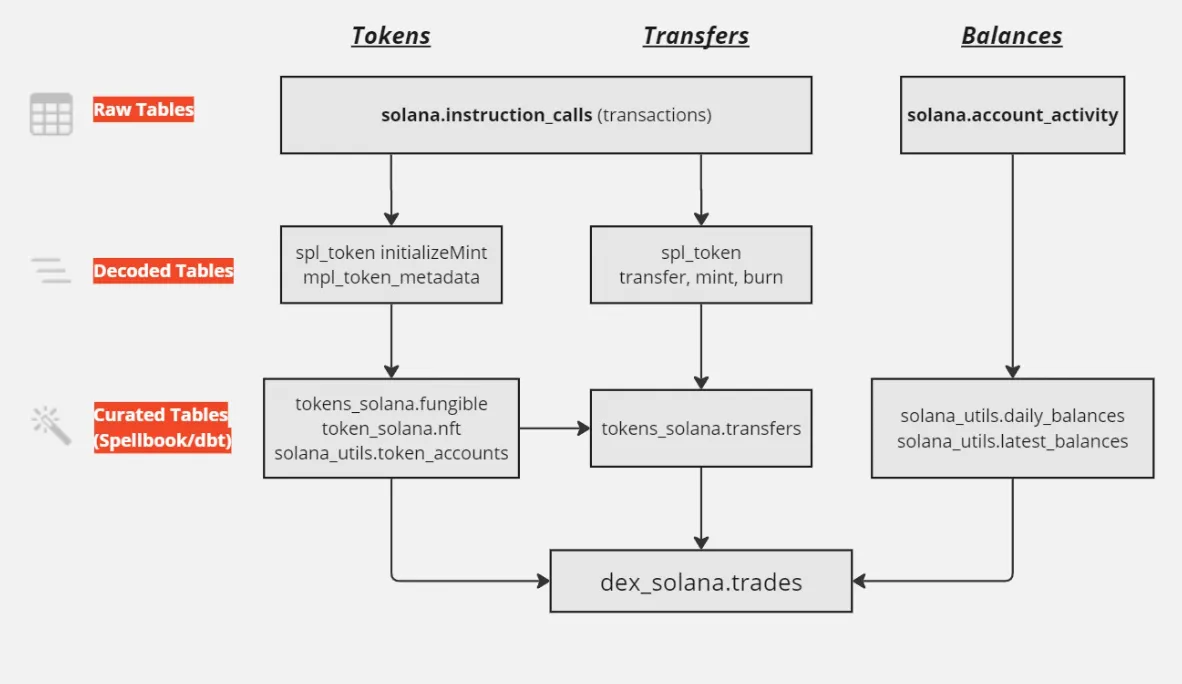
https://read.cryptodatabytes.com/p/starter-guide-to-solana-data-analysis
Dune recommends using decoded tables for performant queries, but Jupiter Lend’s program isn’t decoded yet, so we’ll query raw data to create a curated table.
For this walkthrough, we’ll use the raw solana.instruction_calls table to inspect Jupiter Lend instructions and decode their contents.
Inspecting a known liquidation transaction
To find example liquidation transactions:
- Visit Solscan.io.
- Search for the
Jupiter Lend Borrowprogram using its program ID,jupr81YtYssSyPt8jbnGuiWon5f6x9TcDEFxYe3Bdzi. - Scroll down to the transaction log.
- Click the
instructionfilter. - Select the
liquidateinstruction and clickfilter. - Open two or three transactions and compare their instruction sequences and asset flows.
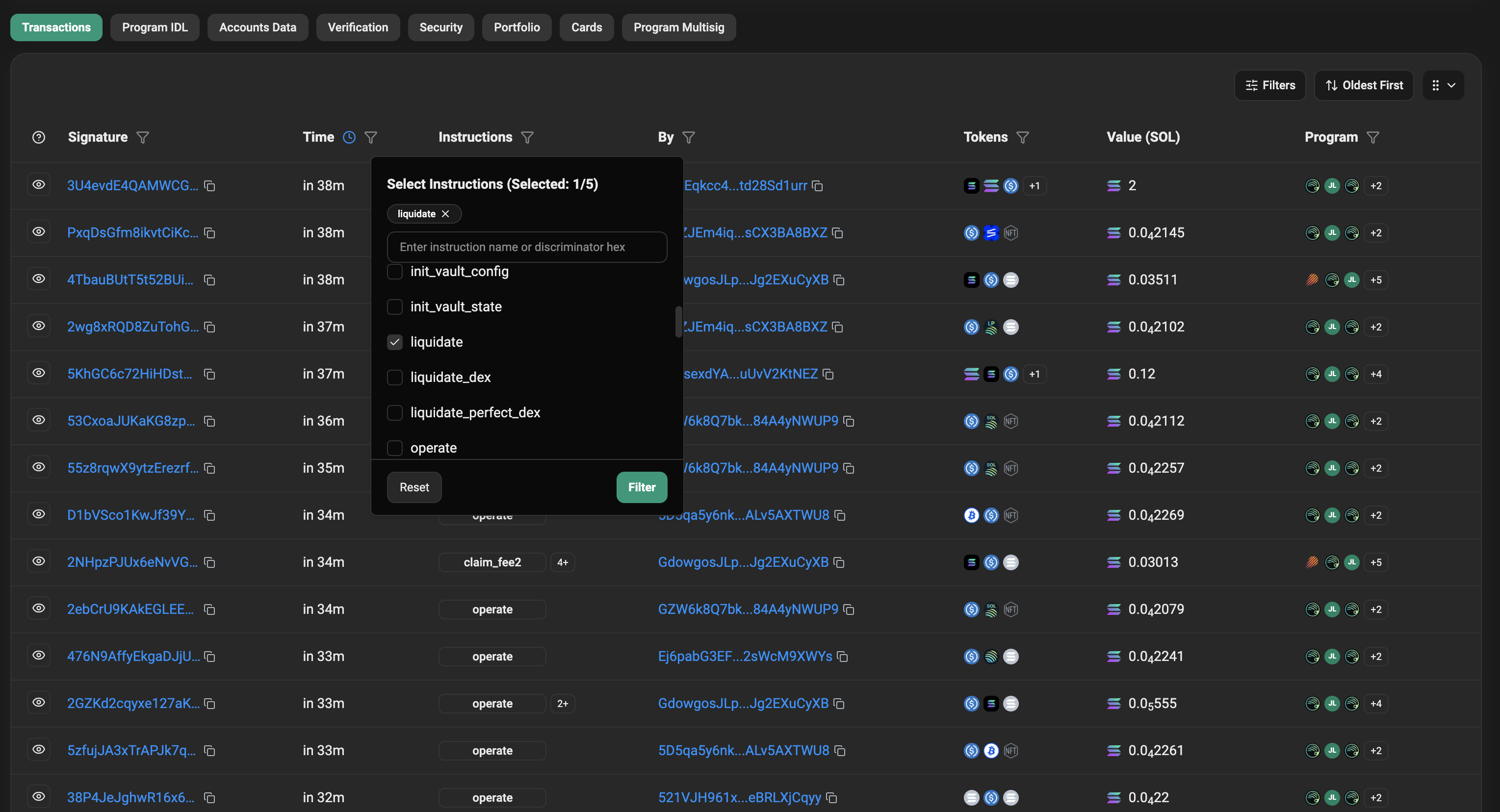
https://solscan.io/account/jupr81YtYssSyPt8jbnGuiWon5f6x9TcDEFxYe3Bdzi
For this guide, we’ll use the transaction vaupfN… as the canonical example. It succeeded on October 10, 2025, contained Jupiter Lend Borrow: Liquidate at outer instruction index 4, and repaid USDC and received WSOL. The transaction also included a flashloan, but we’ll exclude the flashloan logic from this guide.
In the following sections, we’ll use this transaction to identify the liquidation instruction, map accounts, and decode the liquidation amounts. We’ll begin each section with observations on Solscan and then map the desired fields to SQL on Dune.
Identifying the liquidation instruction
Our first step is to identify Jupiter Lend Borrow: Liquidate instructions in successful transactions and extract three fields:
- Transaction ID: Unique signature identifying the transaction.
- Timestamp: Time associated with the transaction’s block.
- Outer instruction index: Position of the top-level instruction containing the liquidation.
In our canonical transaction, the liquidation appears at instruction index 4. However, the index varies across transactions, so we can’t use its positioning as a filter to identify liquidations. Instead, we’ll filter transactions by the program label and instruction name, which remain the same regardless of the index they appear at.
Jupiter Lend Borrow: Liquidate instruction at index 4
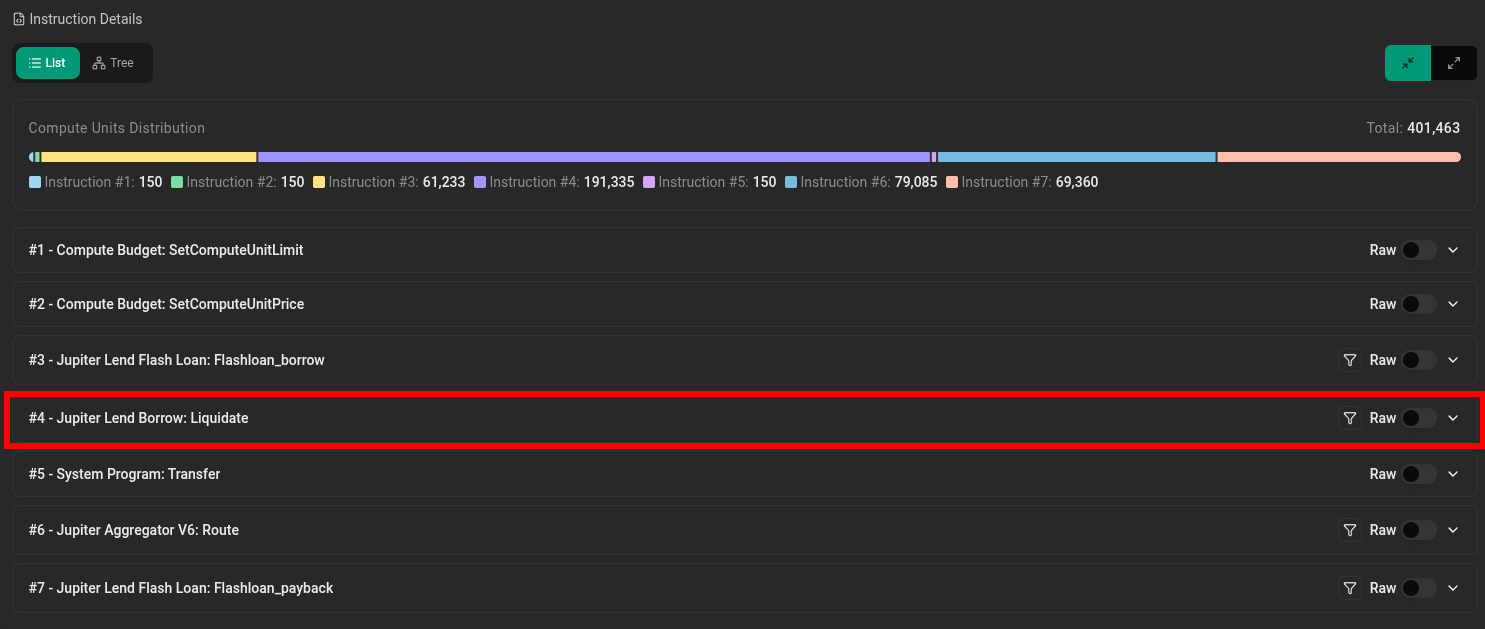 https://solscan.io/tx/vaupfNDZKX9siireKzdK63ZVpqzJMxarsw3LWeBdSZuRMHTFptd2soXiYaRq2nMgtK5X24YAniBsPyrcLYWnUpR
On Solscan, the program label and instruction name appear together as Jupiter Lend Borrow: Liquidate, but Dune represents them across two fields:
executing_accountcolumn: TheJupiter Lend Borrowprogram ID.datacolumn: Serialized instruction data containing theLiquidateinstruction discriminator.
Let’s locate both of these values on Solscan.
We can find the program ID by expanding the liquidation instruction on Solscan. Under Interact With, the program ID is jupr81YtYssSyPt8jbnGuiWon5f6x9TcDEFxYe3Bdzi.
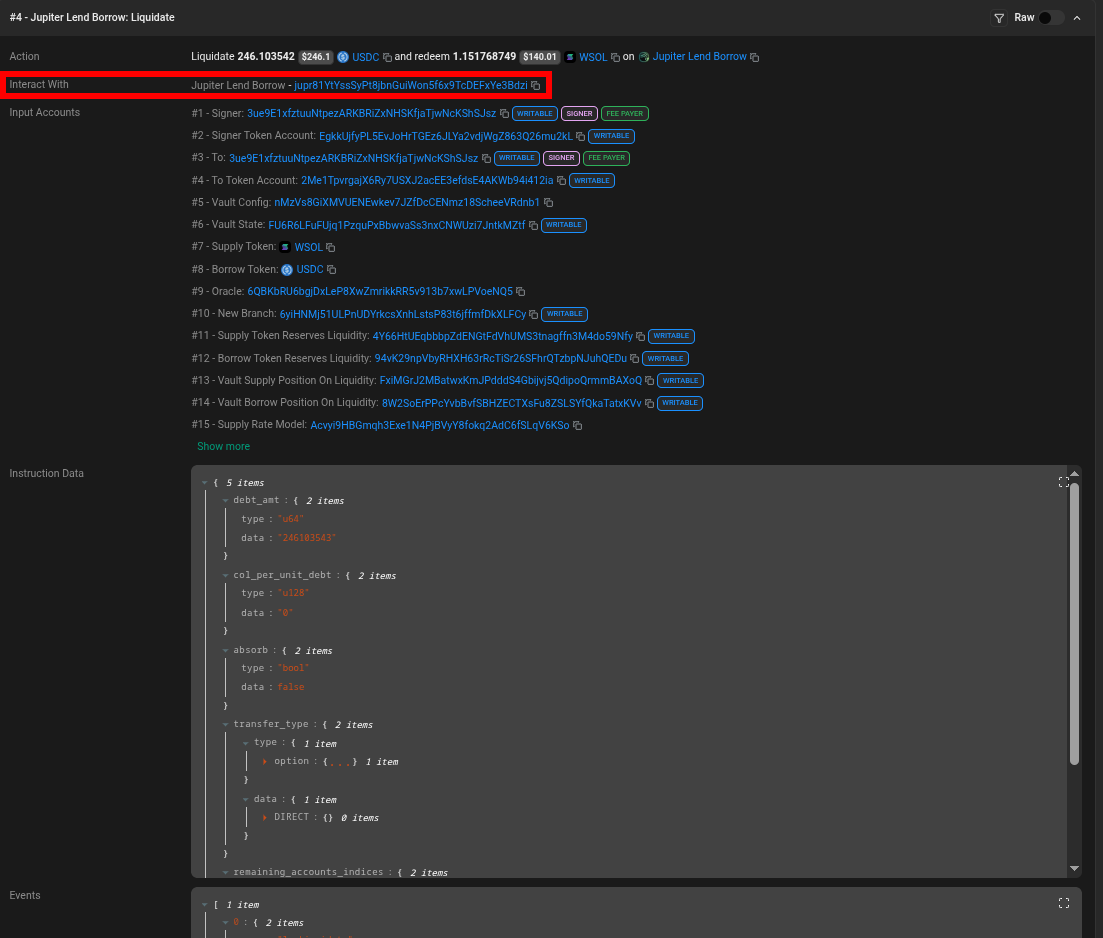
Next, to view the Liquidate instruction’s serialized data, click the “Raw” toggle in the upper-right corner of an instruction. The data appears on one line next to “Instruction Data.”
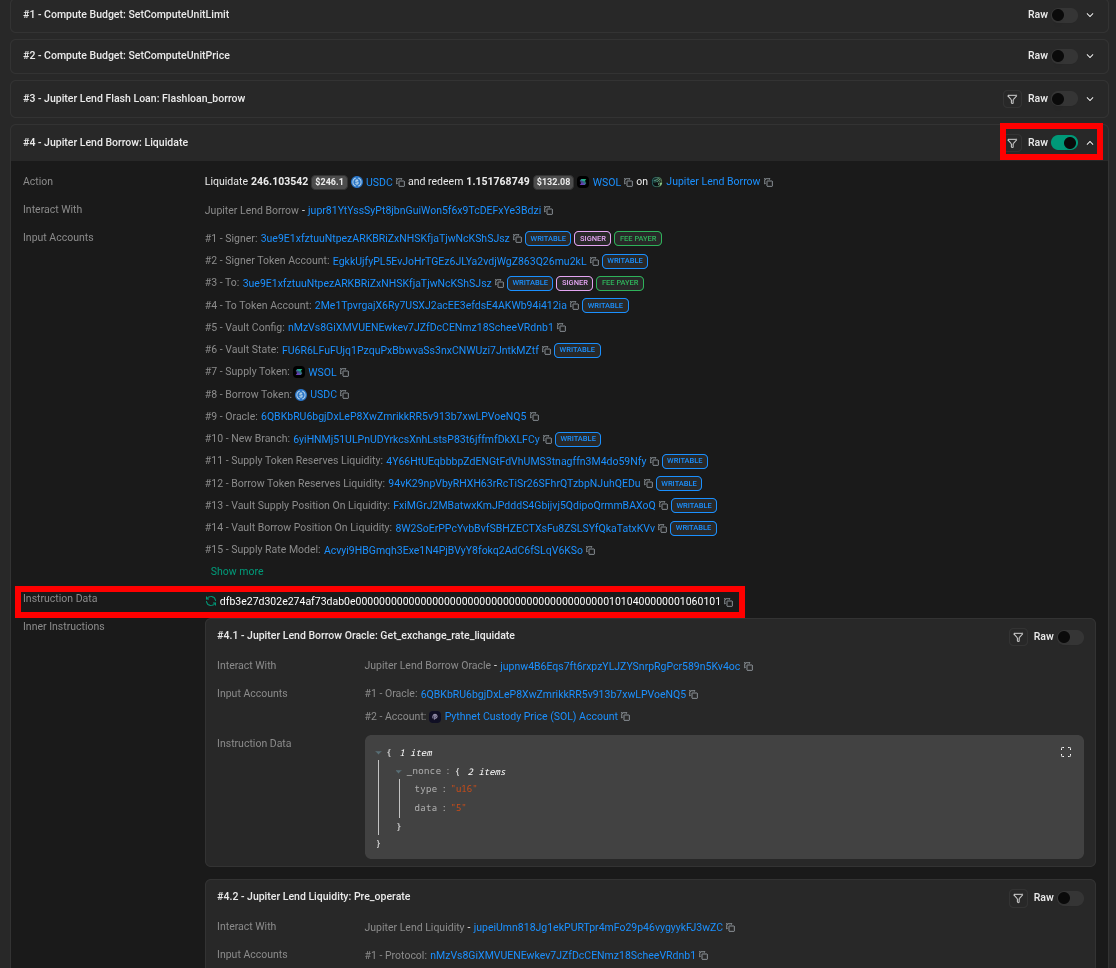
Anchor instruction data begins with an 8-byte discriminator that identifies the instruction, followed by its serialized arguments. In hexadecimal, each byte is represented by two characters, so the first 16 hexadecimal characters identify the instruction’s discriminator.
For Liquidate, the discriminator is dfb3e27d302e274a.
We also need the transaction signature and timestamp, which appear at the top of the Solscan transaction page.
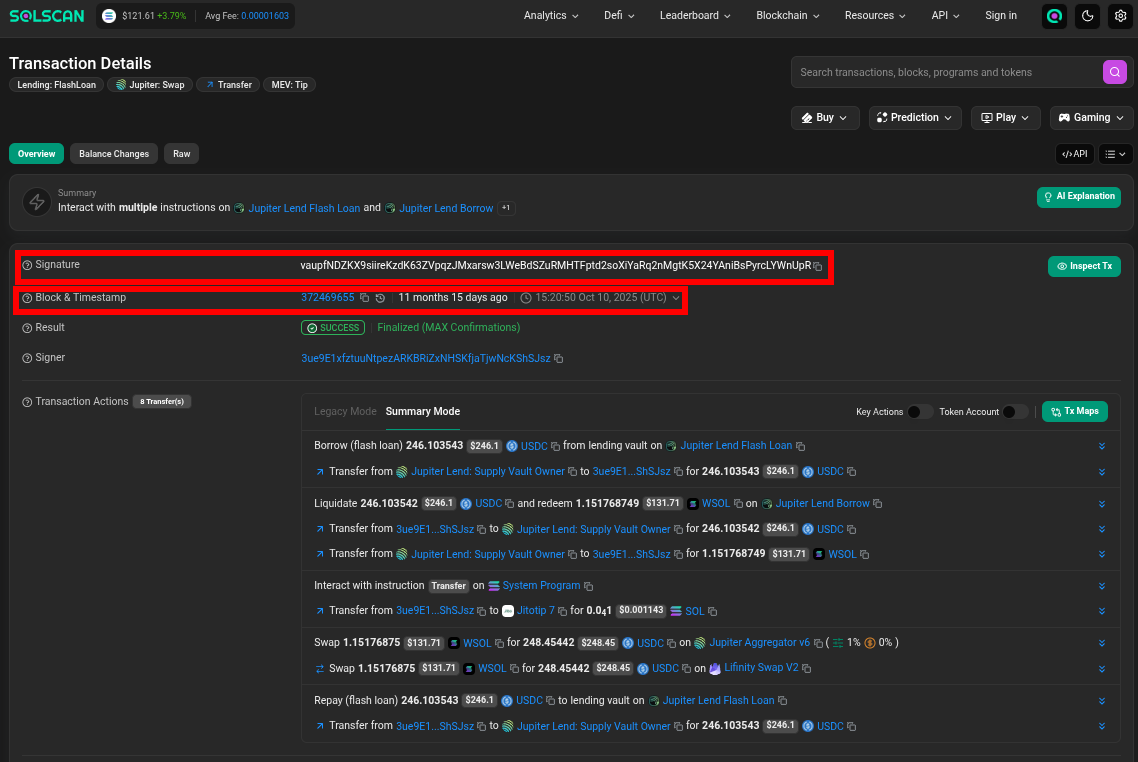
Here’s how each of the observed fields on Solscan maps to columns on Dune:
| Solscan field | Dune representation | |
|---|---|---|
| Instruction index | outer_instruction_index | display/select |
| Program ID | executing_account | filter |
| Instruction discriminator | First 8 bytes of data | filter |
| Signature | tx_id | display/select |
| Timestamp | block_time | display/select |
Now let’s put everything together.
Here’s an example query that identifies successful Liquidate instructions on October 10, 2025. It filters Jupiter Lend Borrow: Liquidate instructions and selects the timestamp, outer instruction index, and transaction ID:
SELECT
    block_time,
    outer_instruction_index,
    tx_id
FROM solana.instruction_calls
WHERE executing_account = 'jupr81YtYssSyPt8jbnGuiWon5f6x9TcDEFxYe3Bdzi'
    AND substr("data", 1, 8) = from_hex('dfb3e27d302e274a')
    AND tx_success = TRUE
    AND block_time >= TIMESTAMP '2025-10-10 00:00:00 UTC'
    AND block_time <  TIMESTAMP '2025-10-11 00:00:00 UTC'
https://dune.com/queries/8822100
The query isolates instruction calls to the Jupiter Lend Borrow program by filtering the executing_account column using its program ID: jupr81YtYssSyPt8jbnGuiWon5f6x9TcDEFxYe3Bdzi.
To isolate Liquidate instructions of the Jupiter Lend Borrow program, the discriminator filter AND substr("data", 1, 8) = from_hex('dfb3e27d302e274a') uses two functions:
substr("data", 1, 8)returns 8 bytes of instruction data, starting at position 1.from_hex(...)converts the hex string into a varbinary value that SQL can compare.
The remaining conditions exclude failed transactions using tx_success = TRUE and restrict the analysis to October 10, 2025, using block_time.
We can now use tx_id and outer_instruction_index to retrieve the account arguments and related inner instructions needed to reconstruct each liquidation.
Mapping the liquidation accounts
Now that we’ve identified the liquidation instructions, we can extract the liquidator and the accounts associated with the collateral and debt assets.
Locating the liquidator account
In the dataset, I define liquidator as the transaction signer exposed by Dune’s tx_signer column.
On Solscan, the transaction signer appears in the overview under “Signer.” In our canonical transaction, the signer’s token accounts supply the debt repayment asset (USDC) and receive the seized collateral (WSOL), as shown under “Transaction Actions” in Summary Mode.
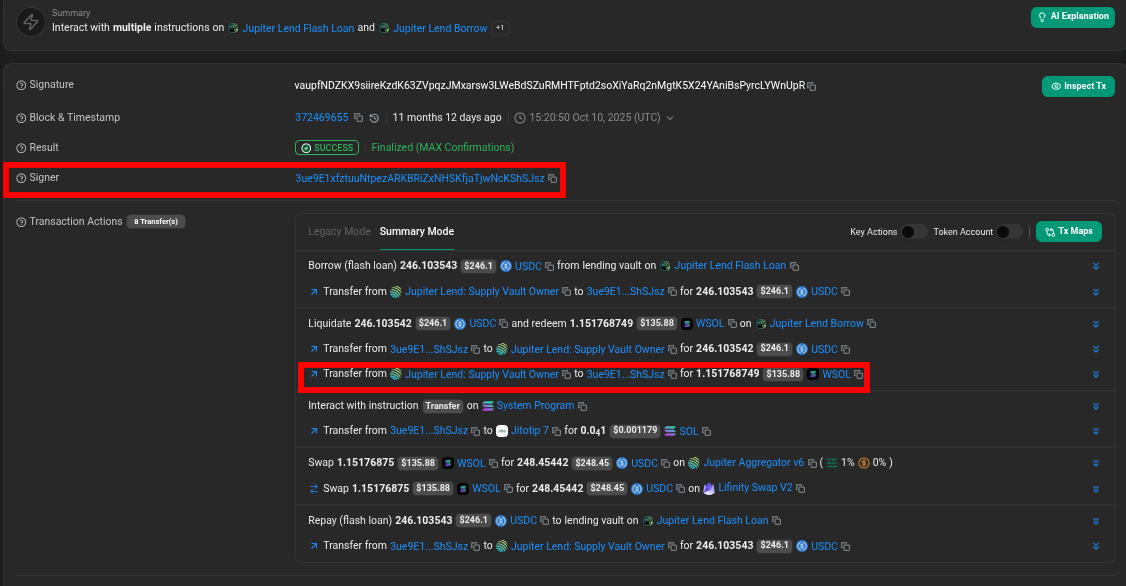
I checked the same relationship across three additional successful liquidations: Example 1, Example 2, and Example 3.
Based on these observations, we’ll use Dune’s tx_signer column as the liquidator address. This is a working definition based on the transactions examined, rather than a guarantee that the signer always receives the collateral.
Here’s an example query that selects tx_signer and renames the column to liquidator:
SELECT
	block_time,
	tx_id,
	outer_instruction_index,
	inner_instruction_index,
	tx_signer AS liquidator
FROM solana.instruction_calls
WHERE tx_id = 'vaupfNDZKX9siireKzdK63ZVpqzJMxarsw3LWeBdSZuRMHTFptd2soXiYaRq2nMgtK5X24YAniBsPyrcLYWnUpR'
	AND executing_account = 'jupr81YtYssSyPt8jbnGuiWon5f6x9TcDEFxYe3Bdzi'
    AND substr("data", 1, 8) = from_hex('dfb3e27d302e274a')
	AND tx_success = TRUE
https://dune.com/queries/8822173
This query reuses the program ID, liquidation discriminator, and success filters introduced in the previous section.
Locating the supply token, borrow token, and borrow position
Next, we need the mint addresses of the collateral seized and debt repaid.
Identifying the supply and borrow mint addresses lets us label assets that were seized as collateral and repaid as debt for each liquidation. The borrow position links those asset flows to the position being liquidated.
On Solscan, expand the Jupiter Lend Borrow: Liquidate instruction and look under “Input Accounts.” In our canonical transaction, the supply and borrow token mints appear at positions 7 and 8, respectively. Lastly, the borrow account appears at position 14.
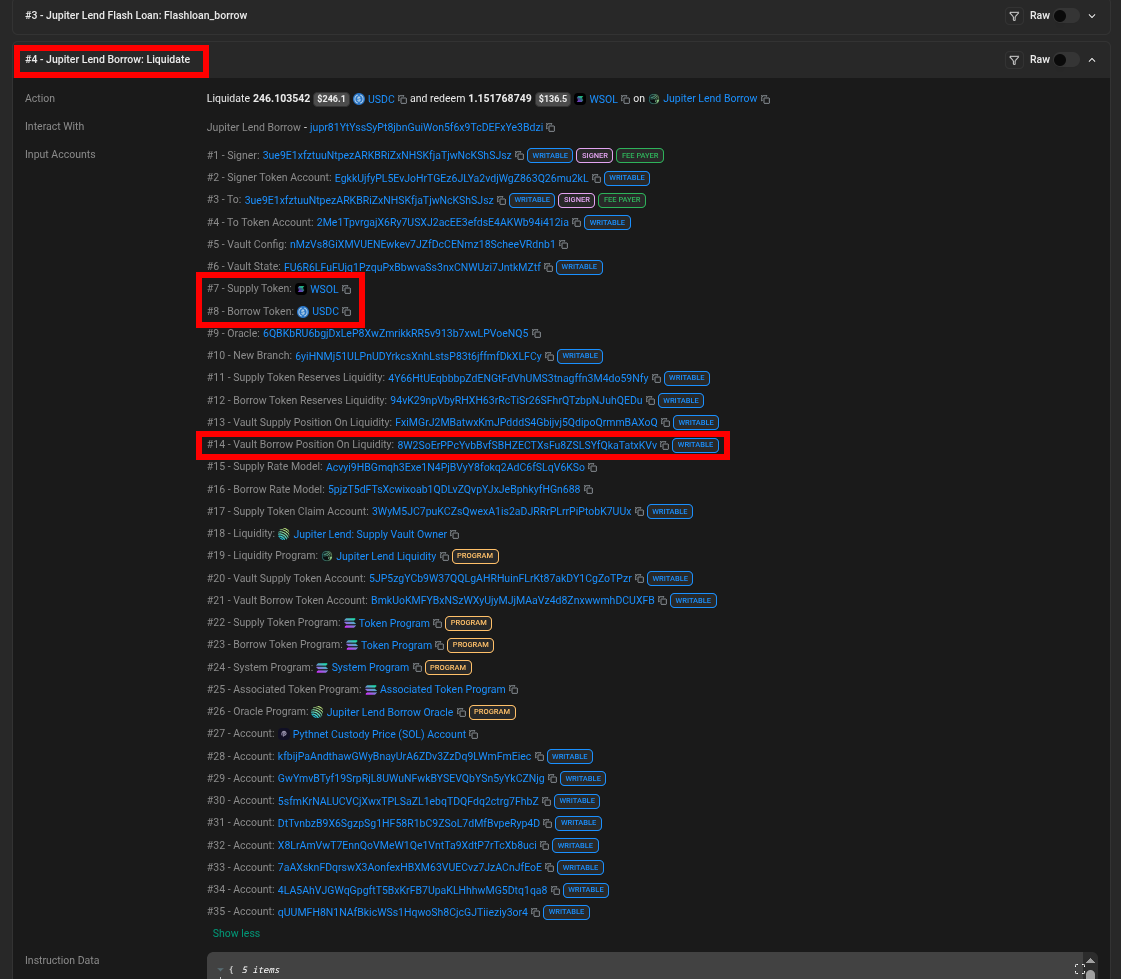
Dune stores the accounts passed to an instruction in the account_arguments array. We can retrieve the observed fields using their positions:
| Solscan label | Dune expression |
|---|---|
| Supply Token | account_arguments[7] |
| Borrow Token | account_arguments[8] |
| Vault Borrow Position on Liquidity, User Borrow Position | account_arguments[14] |
We can now combine the verified account mappings with our previous liquidation filters:
SELECT
	tx_id,
    account_arguments[7]  AS supply_mint,
    account_arguments[8]  AS borrow_mint,
    account_arguments[14] AS position
FROM solana.instruction_calls
WHERE tx_id = 'vaupfNDZKX9siireKzdK63ZVpqzJMxarsw3LWeBdSZuRMHTFptd2soXiYaRq2nMgtK5X24YAniBsPyrcLYWnUpR'
	AND executing_account = 'jupr81YtYssSyPt8jbnGuiWon5f6x9TcDEFxYe3Bdzi'
    AND substr("data", 1, 8) = from_hex('dfb3e27d302e274a')
https://dune.com/queries/8822928
The query reuses the program ID and discriminator filters from the previous section. It retrieves the token mint addresses and borrow position using their positions in account_arguments.
Now we have the core metadata for each liquidation. The current query displays the mint addresses of the tokens. In Part 2, we’ll use token metadata and price data to identify the assets and calculate their USD values.
Decoding liquidation amounts
Next, we need to extract the amounts of debt repaid and collateral seized during each liquidation, which will reveal the value of each liquidation.
In our canonical transaction, Solscan shows the liquidator repaying 246.103542 USDC and receiving 1.151768749 WSOL.
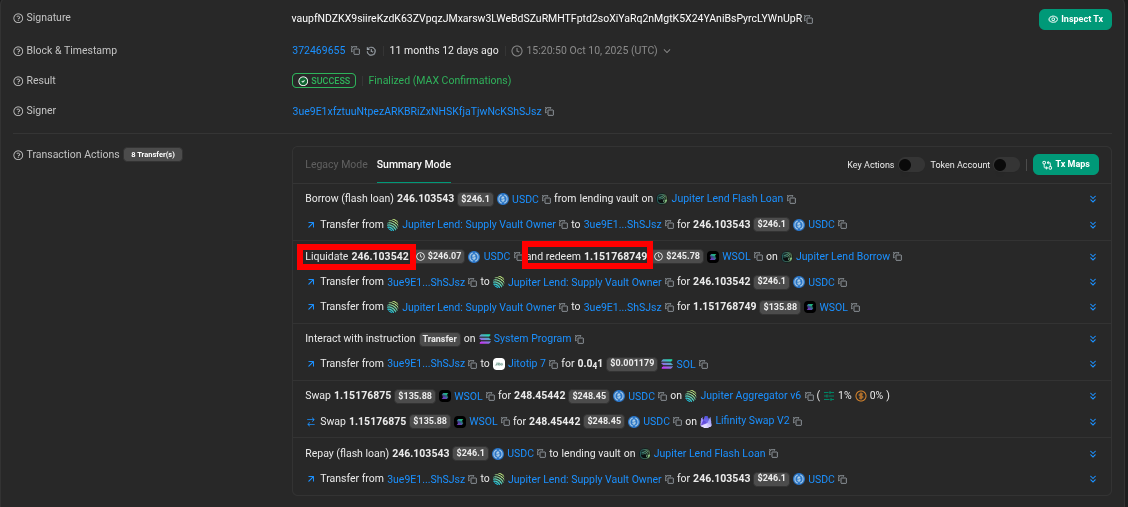
These amounts appear in two Jupiter Lend Liquidity: Operate inner instructions nested within the Jupiter Lend Borrow: Liquidate instruction.
Locating amounts
To find the corresponding instructions, scroll down to the “Instruction Details” section and click the down arrow to the right of each instruction’s name to expand it. Next, search the page (Ctrl + F) for the raw token amounts.
Token amounts are stored in their smallest units. For example, 246.103542 USDC, which has six decimal places, is stored as 246103542.
Searching for this value reveals an inner Jupiter Lend Liquidity: Operate instruction with a negative borrow_amount of -246103542 and a supply_amount of 0.
The Jupiter Lend Liquidity: Operate instruction revealing the debt repaid (borrow_amount).
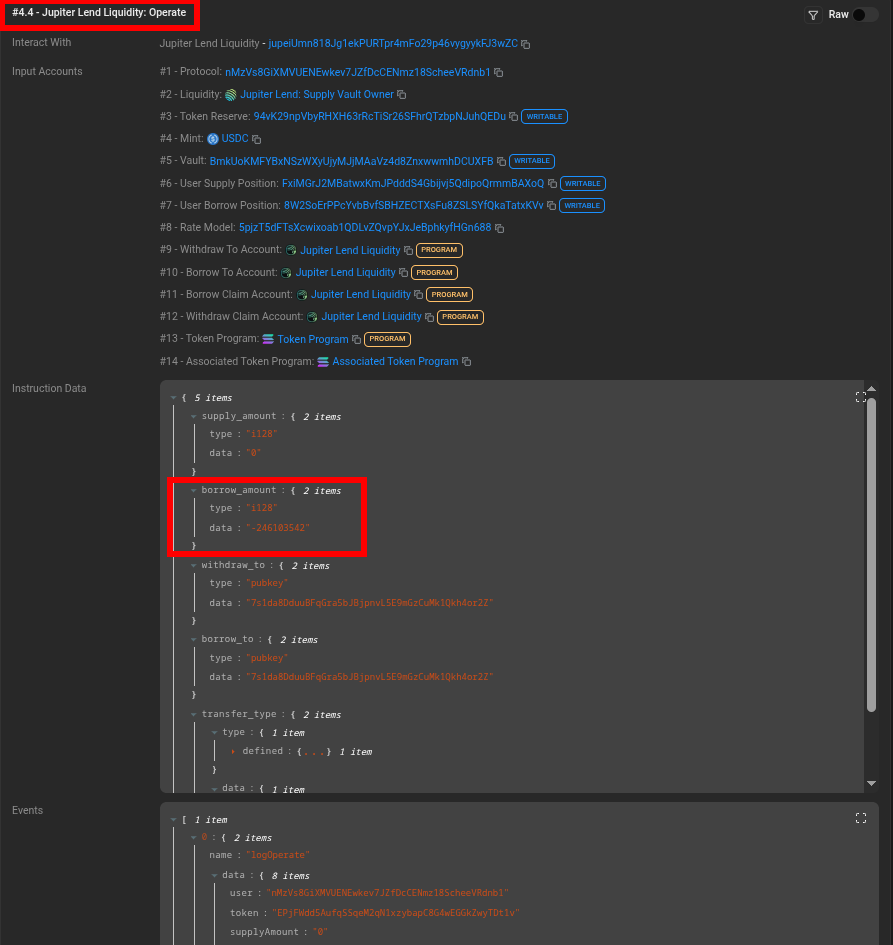 https://solscan.io/tx/vaupfNDZKX9siireKzdK63ZVpqzJMxarsw3LWeBdSZuRMHTFptd2soXiYaRq2nMgtK5X24YAniBsPyrcLYWnUpR
Note: The Liquidate event also exposes a debt_amt field that provides another way to validate the repayment amount. However, because this event data isn’t available in solana.instruction_calls, we’ll extract the amounts from the inner Operate instructions.
Repeating the search for the collateral amount, 1151768749, reveals another Operate instruction with a negative supply_amount and a borrow_amount of 0.
The Jupiter Lend Liquidity: Operate instruction revealing the collateral seized (supply_amount).
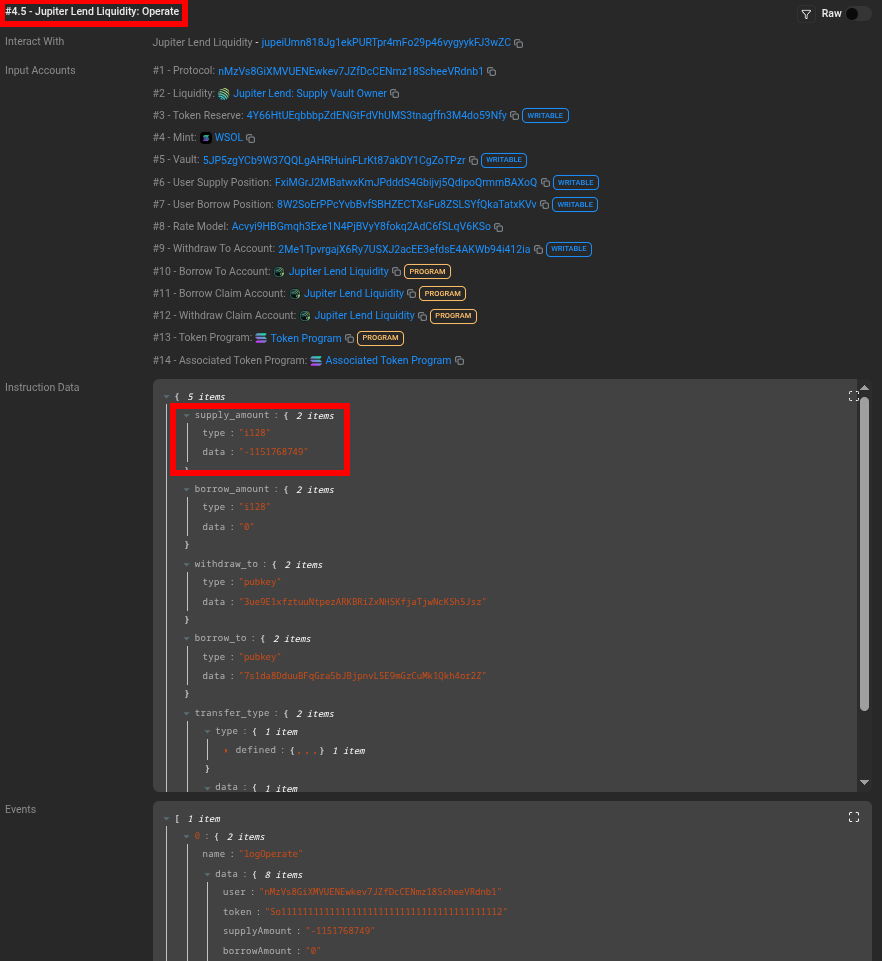 https://solscan.io/tx/vaupfNDZKX9siireKzdK63ZVpqzJMxarsw3LWeBdSZuRMHTFptd2soXiYaRq2nMgtK5X24YAniBsPyrcLYWnUpR
Here’s what the two instructions reveal:
| Inner index | Field | Raw value | Interpretation |
|---|---|---|---|
| 4 | borrow_amount | -246103542 | 246.103542 USDC debt repaid |
| 5 | supply_amount | -1151768749 | 1.151768749 WSOL collateral seized |
Since these are raw base-unit values, 246103542 represents 246.103542 USDC, while 1151768749 represents 1.151768749 WSOL after applying each token’s decimals.
I checked this pattern across three additional liquidations (Example 1, Example 2, and Example 3) and found the same relationship.
Decoding the serialized amounts
Now that we’ve identified the relevant instructions, we need to extract their values from Dune.
On Solscan, select the “Raw” toggle in the upper-right corner of each Operate instruction to view its serialized data.
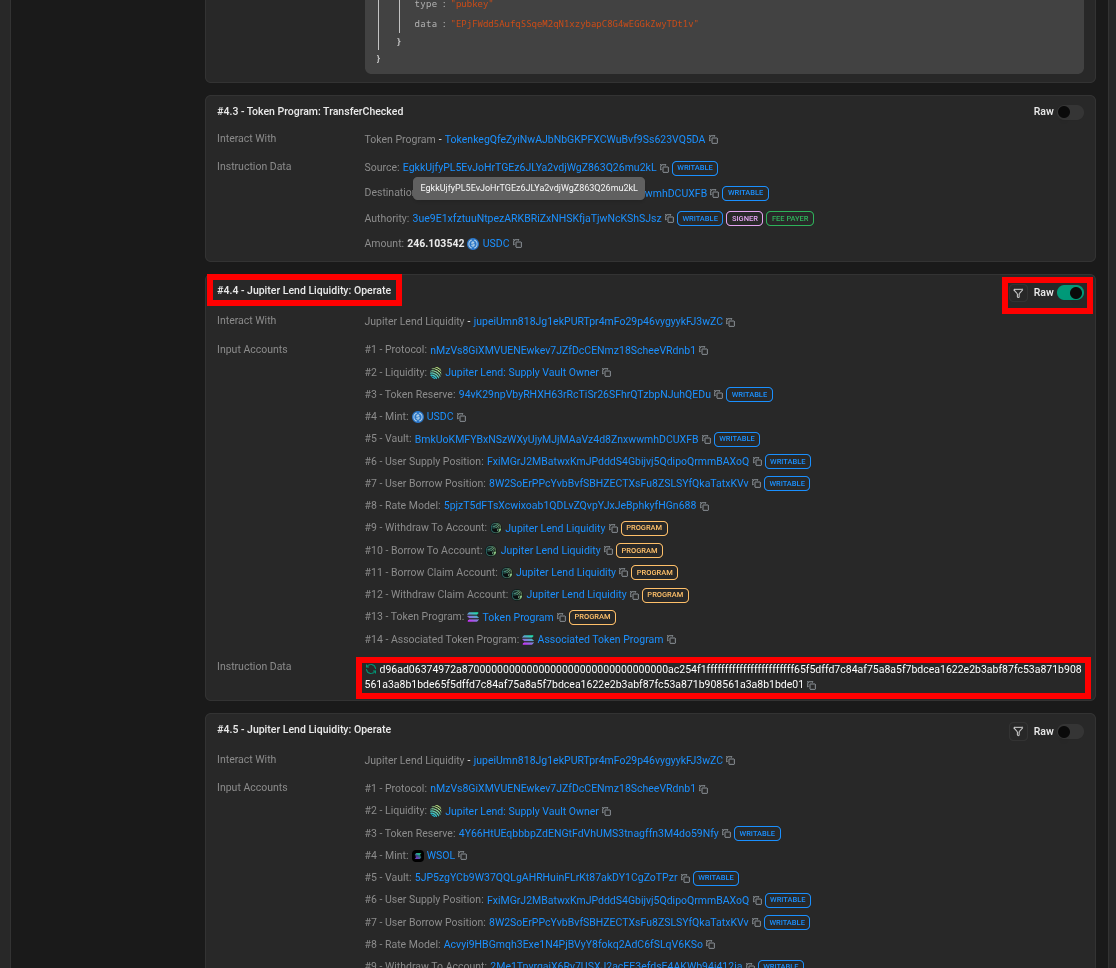
The instruction begins with the 8-byte discriminator d96ad06374972a87, followed by the serialized arguments.
The fields we need occupy the following positions:
| Bytes | Field | Data type |
|---|---|---|
| 1–8 | Instruction discriminator | 8 bytes |
| 9–24 | supply_amount | Signed 128-bit integer |
| 25–40 | borrow_amount | Signed 128-bit integer |
Both amounts are serialized in little-endian byte order, meaning the least significant byte appears first.
In Dune, the payload is stored in the data column of solana.instruction_calls. We can extract the amounts using their byte positions and convert them into integers.
Here’s a query that exposes the raw operate payloads, identifies where the supply_amount and borrow_amount fields are stored, and converts those fields to positive raw integer values:
SELECT
    block_time,
    tx_id,
    outer_instruction_index,
    inner_instruction_index,
    to_hex(substr("data", 1, 8)) AS instruction_discriminator,

    ABS(
        CAST(
            CAST(
                from_big_endian_64(
                    reverse(substr("data", 9, 8))
                ) AS DECIMAL(38, 0)
            ) AS DOUBLE
        )
    ) AS supply_amount,

    ABS(
        CAST(
            CAST(
                from_big_endian_64(
                    reverse(substr("data", 25, 8))
                ) AS DECIMAL(38, 0)
            ) AS DOUBLE
        )
    ) AS borrow_amount,

    "data" AS inner_data
FROM solana.instruction_calls
WHERE tx_id = 'vaupfNDZKX9siireKzdK63ZVpqzJMxarsw3LWeBdSZuRMHTFptd2soXiYaRq2nMgtK5X24YAniBsPyrcLYWnUpR'
  AND outer_instruction_index = 4
  AND inner_instruction_index IS NOT NULL
  AND substr("data", 1, 8) = from_hex('d96ad06374972a87')
ORDER BY inner_instruction_index;
Here’s how the decoding expression works, starting from the innermost clause:
    ABS(
        CAST(
            CAST(
                from_big_endian_64(
                    reverse(substr("data", 9, 8))
                ) AS DECIMAL(38, 0)
            ) AS DOUBLE
        )
    ) AS supply_amount,
substr("data", 9, 8)extracts the 8 bytes containing the supply amount.reverse(...)reverses the byte order because the value is stored in little-endian format.from_big_endian_64(...)reads the reversed bytes as a 64-bit integer.- The live query reads only the lower 8 bytes of each 16-byte
i128field. This works for the observed amounts because they fit within the signed 64-bit range and the remaining bytes are sign extension; the full 16-byte fields should be inspected before applying the shortcut to larger values. CAST(... AS DECIMAL(38, 0))converts the result to a precise whole-number decimal;38allows up to 38 total digits and0allows no digits after the decimal point.CAST(... AS DOUBLE)converts the decimal to a floating-point number for later arithmetic, but floating-point conversion can lose precision for sufficiently large raw amounts.ABS(...)removes the negative sign and returns the positive amount.- The serialized amount is signed, so the negative value must be interpreted before
ABS()is used to present a positive analytical magnitude. The canonical transaction has a negativeborrow_amountfor debt repayment and a negativesupply_amountfor collateral leaving the lending position. AS supply_amountnames the resulting columnsupply_amount.
The same process is used for the debt side, starting at byte 25:
    ABS(
        CAST(
            CAST(
                from_big_endian_64(
                    reverse(substr("data", 25, 8))
                ) AS DECIMAL(38, 0)
            ) AS DOUBLE
        )
    ) AS borrow_amount,
The query returns raw token amounts, not human-readable quantities or USD values. To convert them, we divide by 10^decimals for each token and multiply the resulting quantity by its historical USD price.
In Part 2, we’ll rank the inner Jupiter Lend Liquidity: Operate instructions and join them with token metadata and historical prices from the prices.hour table to calculate their USD values.
Conclusion
This walkthrough established how to map transaction fields from Solscan to Dune’s solana.instruction_calls table and decode signed raw amount fields from the canonical liquidation.
In Part 2, we’ll combine these steps into a reusable query that reconstructs liquidation records and calculates their USD values.